Hertz Sound Mac App Store

Emotions
become sound.

Hertz Sound takes the signal from your EEG headset and plays it, live: seven frequency bands turn into notes, rhythms and effects. As you relax, focus or feel, the music changes with you.

For Macs with Apple silicon, macOS 15 or later. Free with the Demo and EEG recordings, every feature included; a real headset unlocks with a 3-day trial, then €19.99/year or €47.99 forever.

7 bands → 7 voices up to 16 modules ADSR · filter · drive mind-driven drums reverb · delay WAV recording MIDI · OSC Touch Bar English · Italian
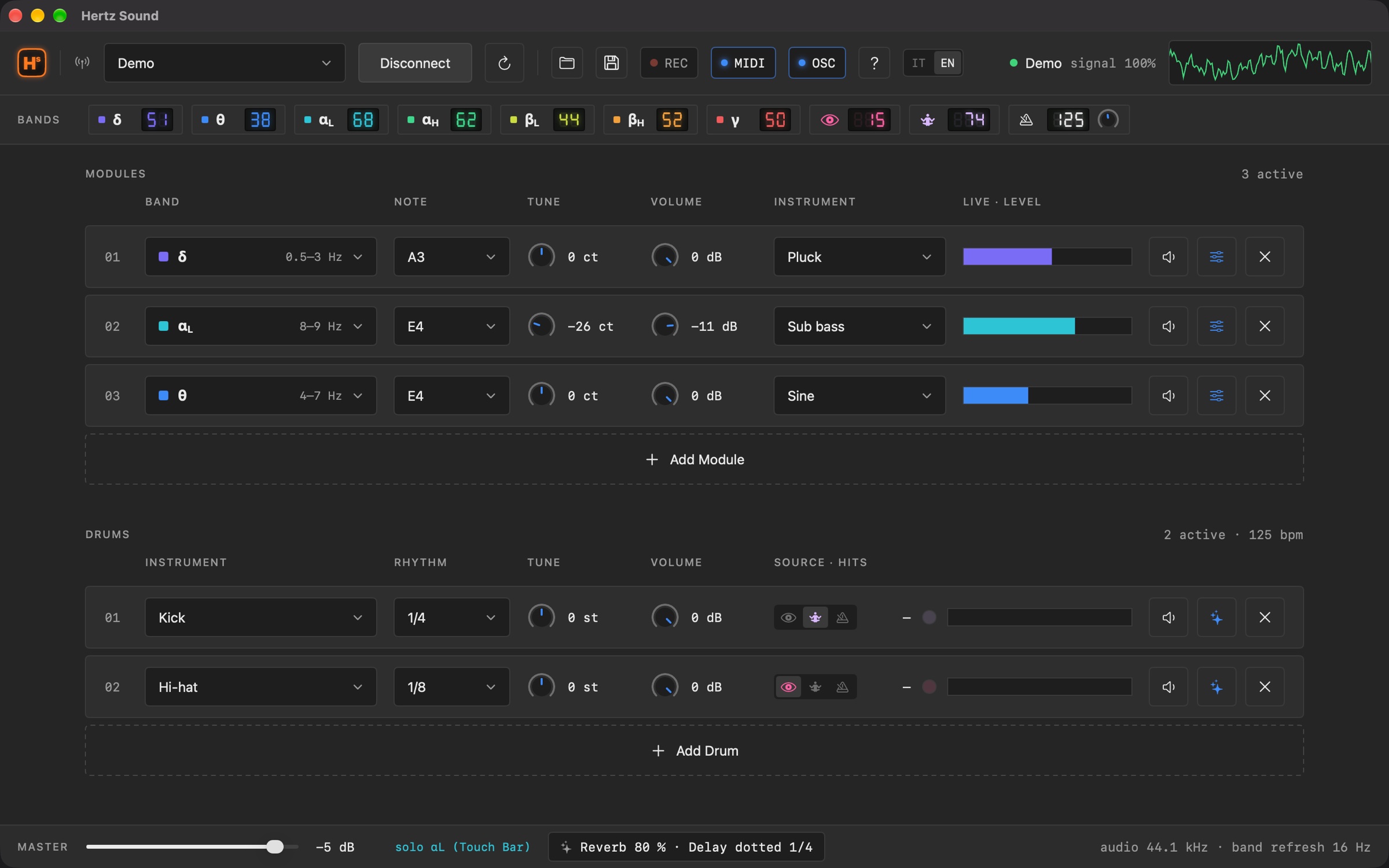
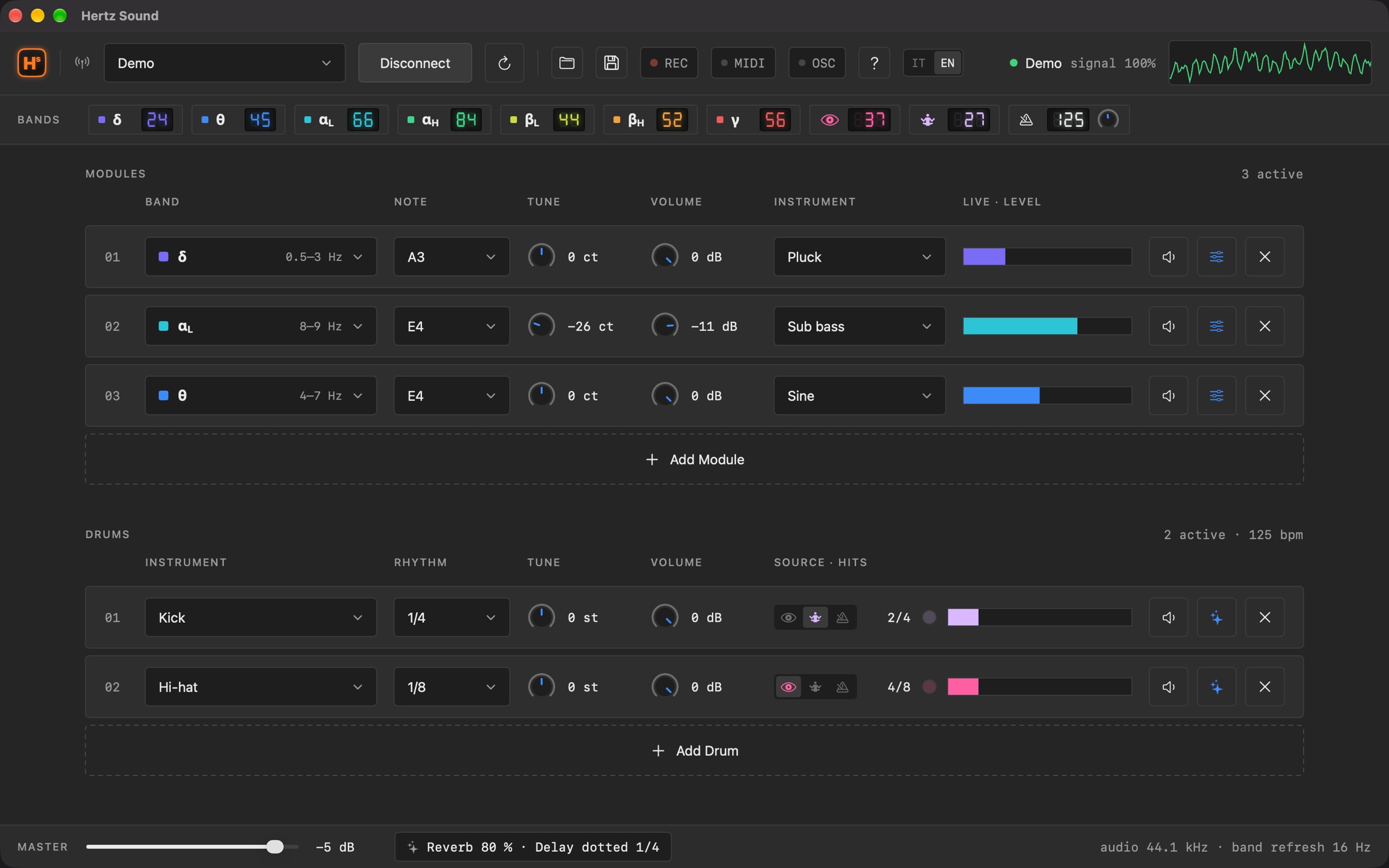
The Hertz Sound window: top bar with the live trace, strip of the 7 bands, rows of tonal modules and drums, master bar
The Hertz Sound window. The 7 bands on segment displays at the top, the playing modules and drums below, the master at the bottom.
In thirty seconds

One electrode on your forehead. An orchestra in your Mac.

Hertz Sound doesn't "read" your mind or judge it: it plays it. It splits the headset signal into seven frequency bands and hands each one to an instrument. When a band rises against itself, its instrument plays louder. The rest is up to you: notes, timbres, rhythm, effects.

Seven bands, seven voices

Delta, theta, two alphas, two betas and gamma. Each module links a band to a note and an instrument: sine, pad, plucked string, sub bass, FM bell. Up to 16 modules, each with its own sound.

Rhythm that listens

Kick, snare, hi-hat, clap and woodblock play on the tempo you choose. The headset's attention and meditation decide how many hits come in: from just the downbeat up to the full grid.

Beyond the app

Record what you hear to WAV. Send notes and bands to your DAW over MIDI, or to TouchDesigner, Max, Resolume and VCV Rack over OSC. Save your EEG sessions and re-sound them whenever you like.

01 · Input
EEG headset

Bluetooth, one electrode on the forehead. Or the Demo, or a .hzraw recording.

02 · Analysis
7 bands

Each measured against its own average: 50 is "as usual", 99 is the peak.

03 · Instruments
Modules and drums

Bands drive the volume and filter of the voices; attention and meditation the density of the rhythm.

04 · Space
Reverb and delay

On sends, in time: each module decides how much it wants.

05 · Outputs
Speakers and more

All at once, whenever you like.

speakersWAVMIDIOSC

Play right away, even without a headset

When it opens, the app is in Demo mode: a believable synthetic EEG, with a breathing alpha and the odd blink, and a small ensemble ready to go. Sound, modules, effects, REC, MIDI and OSC all work this way, free and with no time limit.

  • Set up your DAW before the headset arrives: the MIDI port and OSC are there in Demo too.
  • A real recording? A .hzraw file reopens and plays as if the headset were connected, always free.
  • Once you have the headset, pair it in macOS Bluetooth Settings, pick it from the device menu and press Connect.

BandRangeWhen it rises, usually
δ delta0.5–3 HzMovement, big slow waves
θ theta4–7 HzDrowsiness, imagination
αL low alpha8–9 HzEyes closed, calm
αH high alpha10–12 HzRelaxed alertness
βL low beta13–17 HzActivity, active thinking
βH high beta18–30 HzFocus, tension
γ gamma31–45 HzIntense processing, and the jaw muscles
How the window works

A mixer, read from top to bottom.

One window, laid out like a desk: at the top where the signal comes from, then the bands, then one row per instrument, the master at the bottom. Everything is set with knobs you drag, turn with the mouse wheel or with two fingers on the trackpad; double-click and they go back to their default.

Top bar: device menu, Connect, status with the mini trace, open and save modules, REC, MIDI, OSC, guide
01 · TOP BAR

Where the signal comes from, and where it goes

The menu of paired headsets (with the Demo and Open EEG Raw…), Connect and the button that reloads the Bluetooth devices. The status LED and a mini trace of the raw signal, green when it's live, with contact quality and headset battery.

Then open and save modules (.hzsound), REC, MIDI and OSC, each with its own light, and the guide.

Band strip: seven colored segment displays, attention, meditation and the tempo knob
02 · BAND STRIP

Seven displays, one tempo

Each band has its own display in its own color: the level, meaning how active it is compared with its own average over the last ~10 seconds. 50 is average, 99 is the peak. So every band is heard when it rises against itself, and delta, always the largest in µV, doesn't drown out gamma.

Then attention and meditation (0–100, from the headset) and the tempo knob in bpm.

A tonal module row: band, note, tune in cents, volume, instrument, live bar, sound, mute, remove
03 · TONAL MODULE

One band, one note, one instrument

The Band that drives it, Note (with its octave), Tune for fine tuning in cents, Volume, Instrument. The Live bar shows how much it's playing right now.

On the right the speaker that mutes the row, the sound button, which lights up when the timbre isn't the default one, and the ✕ that removes it.

A drum row: instrument, rhythm, tune, volume, source and active hits
04 · DRUM

One piece of the kit, one source

Instrument (kick, snare, hi-hat, clap, woodblock), Rhythm (1/2, 1/4, 1/8, 1/16), Tune in semitones, Volume.

The source says who sets the density: the eye for attention, the figure for meditation, the metronome for nobody. Next to it, the active steps out of those in the bar, for example 3/4.

Master bar: overall volume in dB, effects button, audio sample rate
05 · MASTER

Overall volume and effects for everyone

The master slider in dB, the button that opens the shared reverb and delay, the audio sample rate. If you soloed a band from the Touch Bar, it shows up here in plain sight, and one click clears it.

Tonal modules

Choose who plays what.

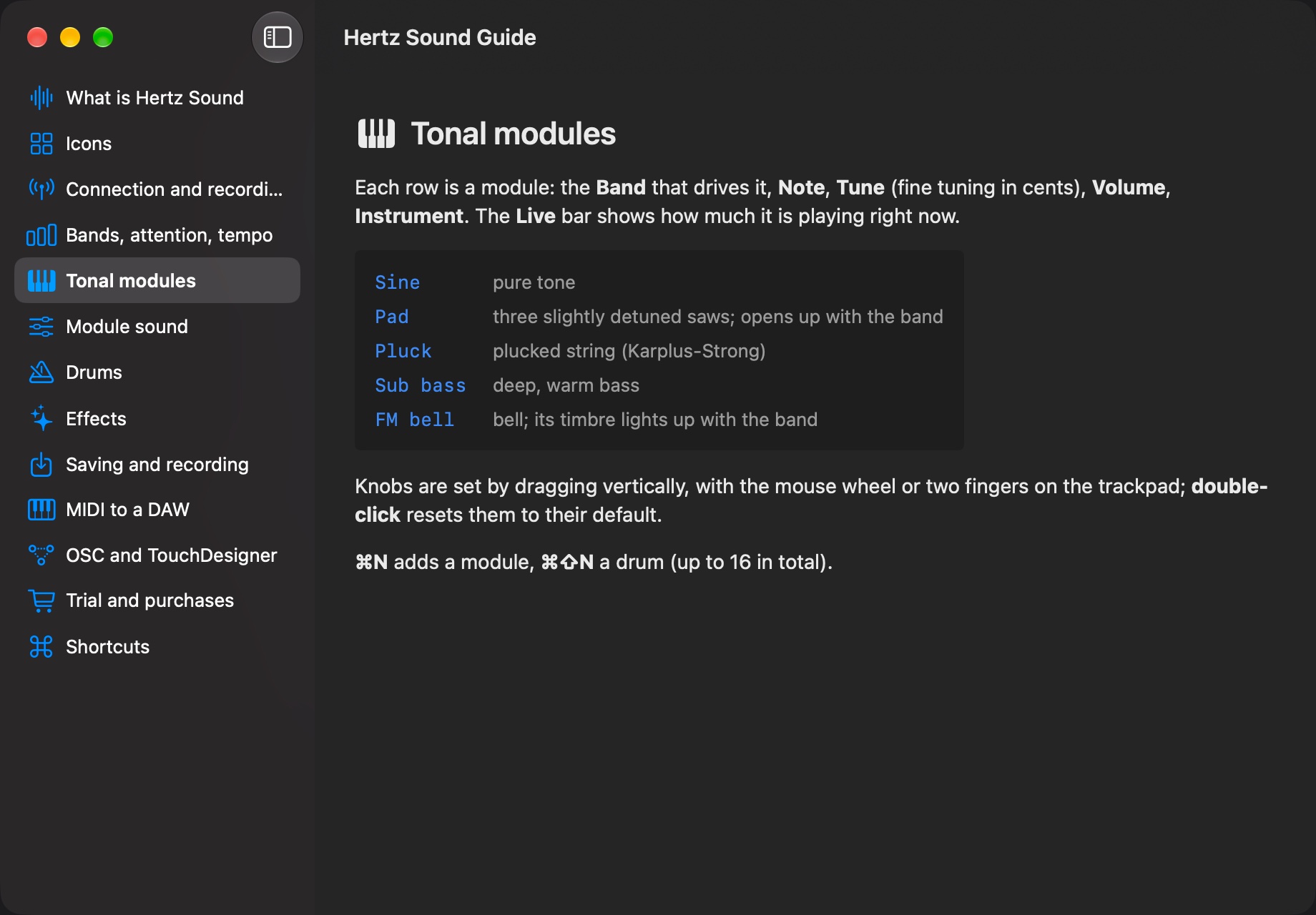
A module is a voice: a band drives it, you choose note, tuning, volume and instrument. When you open the app there's already a small ensemble (alpha on the pad, theta on the sine, high beta on the string, delta on the bass); from there you add, remove, change. ⌘N adds a module, up to 16 voices in total across modules and drums.

Sine

The pure tone. Perfect for hearing a band on its own, with no color.

Pad

Three slightly detuned saws: a carpet that opens up as the band rises.

Pluck

A plucked string (Karplus-Strong): in time, it becomes an arpeggio.

Sub bass

A deep, warm bass, for the delta swaying slowly under everything else.

FM bell

A bell whose timbre lights up with the band: the more active, the brighter.

Module sound

From soft pad to acid, in the same module.

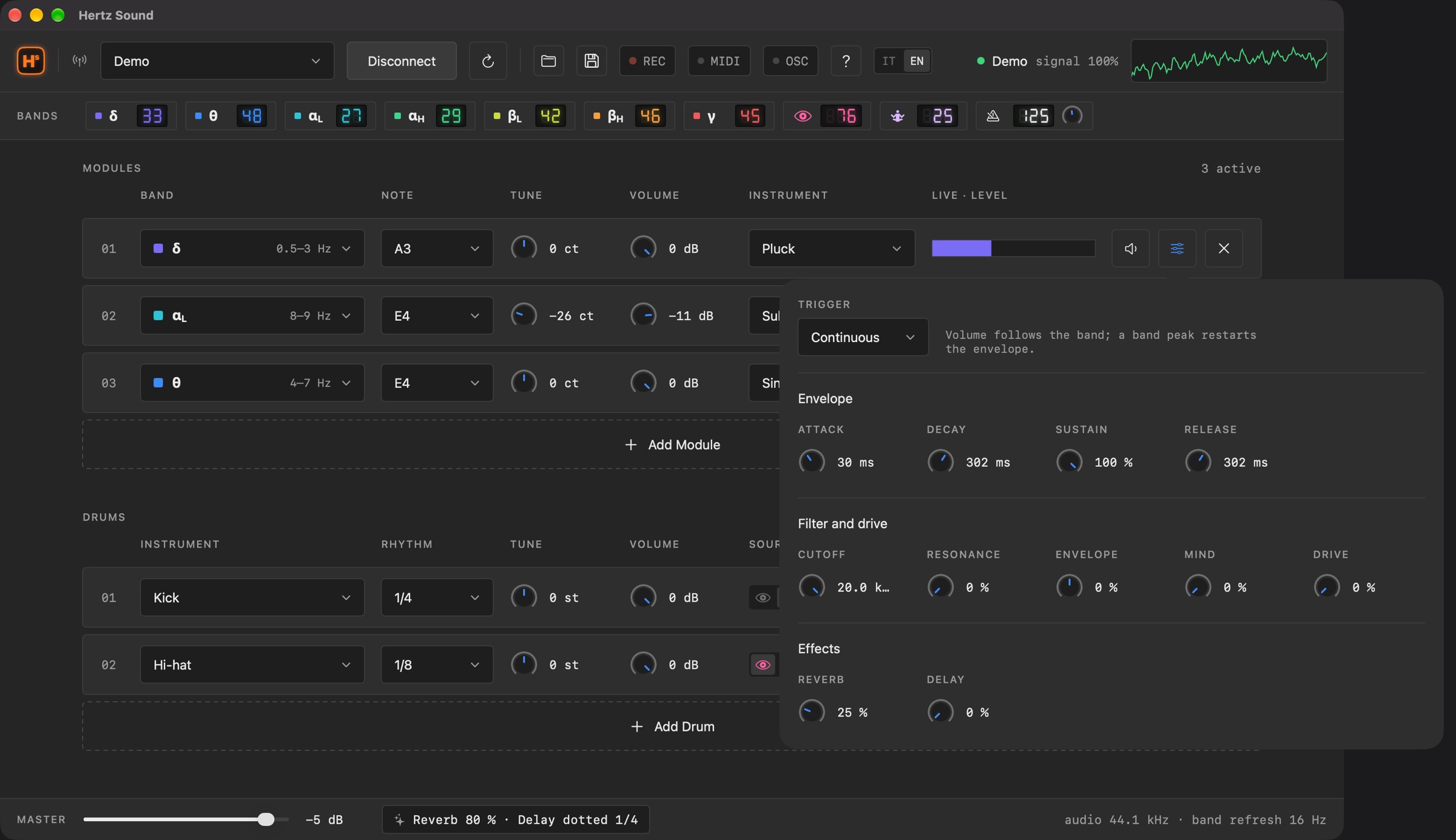
Every module has its own panel: the chain is instrument → drive → filter → envelope. Your mind doesn't just move the volume: it can open the filter, retrigger the envelope, decide how many notes play on the tempo grid.

A module's sound panel: trigger, ADSR envelope, filter with cutoff, resonance, envelope and mind, drive, effect sends
The sound panel. It opens from the row's ⫶ button; the button stays lit as long as the timbre isn't the default one.

Continuous or in time

  • Continuous: the volume follows the band; a band peak retriggers the envelope, like an accent.
  • From 1/2 to 1/16: notes land on the tempo grid, and the band decides how many play and how hard. Without signal, it's silent.
  • Sends: how much of the module goes to the shared reverb and delay.
Attackhow long the note takes to rise
Decayhow long it takes to fall to the sustain
Sustainthe level it holds while it lasts
Releasehow long it takes to fade out
Cutoffabove this frequency the sound gets darker
Resonancea peak at the cutoff: from soft to acid
Envelopehow much the envelope opens (+) or closes (−) the filter
Mindhow much the band opens the filter: the more active, the brighter
Drivesaturation: warmth first, then distortion

Acid recipePluck or Sub bass at 1/16, Cutoff ~300 Hz, Resonance 80 %, Envelope +60 %, Mind 40 %, Drive 50 %. Then focus, and hear the filter open.

Drums and tempo

The more present you are, the fuller the beat.

Drums don't follow a band: they play on the global tempo grid, and their source, attention or meditation, sets the density. By default the kick follows meditation and the rest follow attention. ⌘⇧N adds a drum.

low source
+ beat 3
+ 2 and 4
+ off-beats
full source
0attention100

Hits come in by musical weight

With a low source only the downbeat plays; as it rises, beat 3 comes in, then 2 and 4, then the off-beat eighths, and finally the sixteenths. The rhythm never turns random: it fills up the way a drummer would fill it.

  • Rhythm: the grid of the part, from 1/2 (two hits per bar) to 1/16.
  • Metronome: with no source the module always plays every hit.
  • Tempo: from 40 to 220 bpm with its knob (double-click = 120). Drums, tempo-synced notes and the delay all follow it.
  • Without signal (headset disconnected, or an electrode not touching the skin) the drums go silent, and restart on their own when the signal returns.
Effects

A room, or a cathedral.

Reverb and delay are on sends, like on a real mixer: each module decides how much to send, and the button in the master bar sets them for everyone.

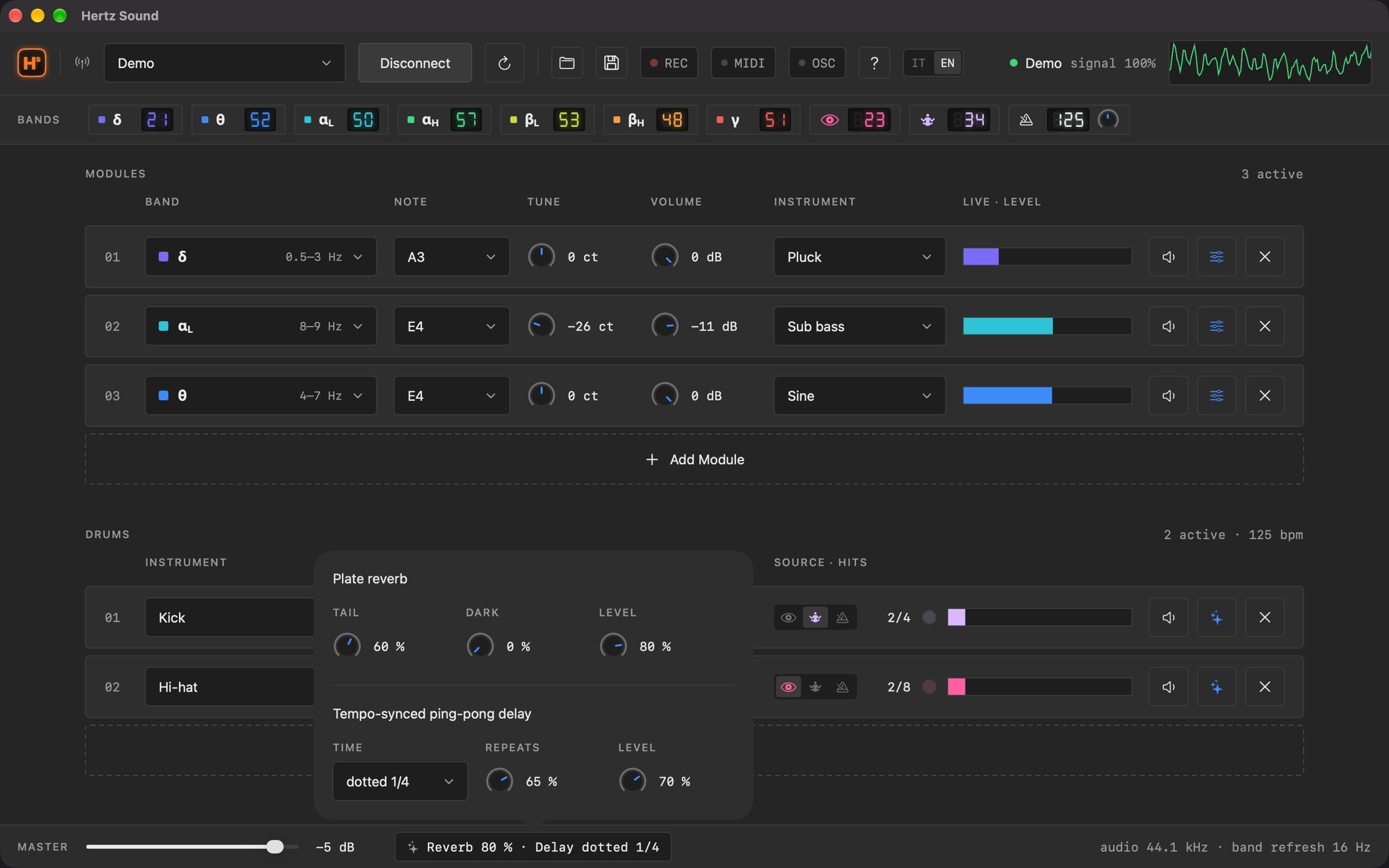
The shared effects panel: reverb with tail and dark, delay with time, repeats and level
Shared reverb and delay, opened from the effects button in the master bar.

Plate and ping-pong

The reverb is a stereo plate (Dattorro), without lows, so it stays clean even with the sub bass underneath. The delay bounces between left and right in time with the bpm, and gets darker with every repeat, like an analog delay.

  • Tail: the length of the reverb.
  • Dark: how much the tail loses its highs as it fades.
  • Time: the delay in notes; dotted 1/8 is the classic.
  • Repeats: how many times the echo comes back, up to 90 %.
  • Level: the effect volume in the mix.
Recording and saving

The sound, the signal, the setup.

Three different files for three different things, and all of them stay on your Mac: a WAV for what you heard, a .hzraw for the signal it came from, a .hzsound for the way you played it.

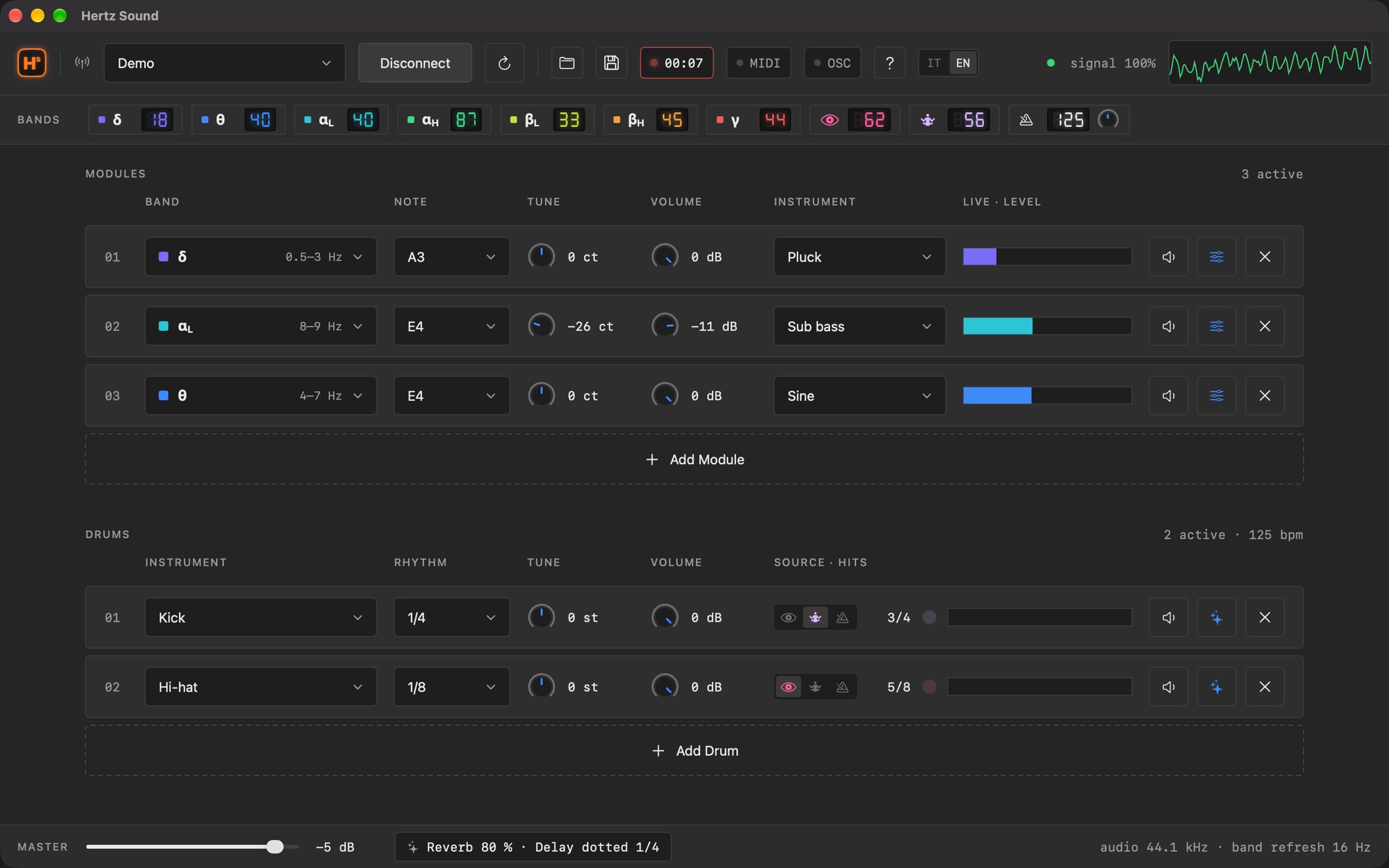
Recording in progress: the red REC light blinks and the time runs in the top bar
Recording. The light blinks and the time runs; the file is already in Music › Hertz Sound.

REC: what you hear, to WAV

⌘R records what comes out of the speakers to 24-bit stereo WAV, effects included, in the Music › Hertz Sound folder, with the date in the name. The live sound isn't affected: the file is written outside the audio thread. One hour takes about 1 GB.

EEG sessions (.hzraw)

While you're connected, the app keeps the headset's raw data; when you disconnect it offers to save it wherever you like (under 10 seconds it doesn't ask). Open EEG Raw… (⌘⇧O) replays it with its original timing: bands, attention and meditation come back identical, and you can re-sound a session as many times as you like.

Setups (.hzsound)

⌘S saves all modules with their sounds, the tempo, the effects and the master; ⌘O loads them back. They're JSON files: share them, version them, write them by hand. One setup per genre, one for live, one for meditation.

Always where you left it

Even without saving, modules are kept automatically between sessions: reopen the app and your instrument is just as you left it.

MIDI and OSC

Your mind, in your DAW and on stage.

Hertz Sound plays on its own, but it isn't an island. MIDI brings notes, drums and bands into Logic, Ableton, Bitwig or Reaper, where you play them with your own instruments. OSC sends the same data over the network, for visuals and installations.

MIDI: a virtual "Hertz Sound" port

Turn on MIDI in the top bar: a Hertz Sound port appears in your DAW. Select it as a track input and record.

channels 1–9, 11–15one tonal module each, in row order; cents go to pitch bend (±2 semitones)
continuousnote held while the band plays; CC 11 (expression) = level
tempo-syncedone note per hit, velocity from the band
channel 10drums: kick 36, snare 38, hi-hat 42, clap 39, woodblock 76
channel 16bands as CC 20–26 (delta…gamma), attention CC 27, meditation CC 28

Channel 16 CCs map to any parameter: for example meditation to a track's reverb.

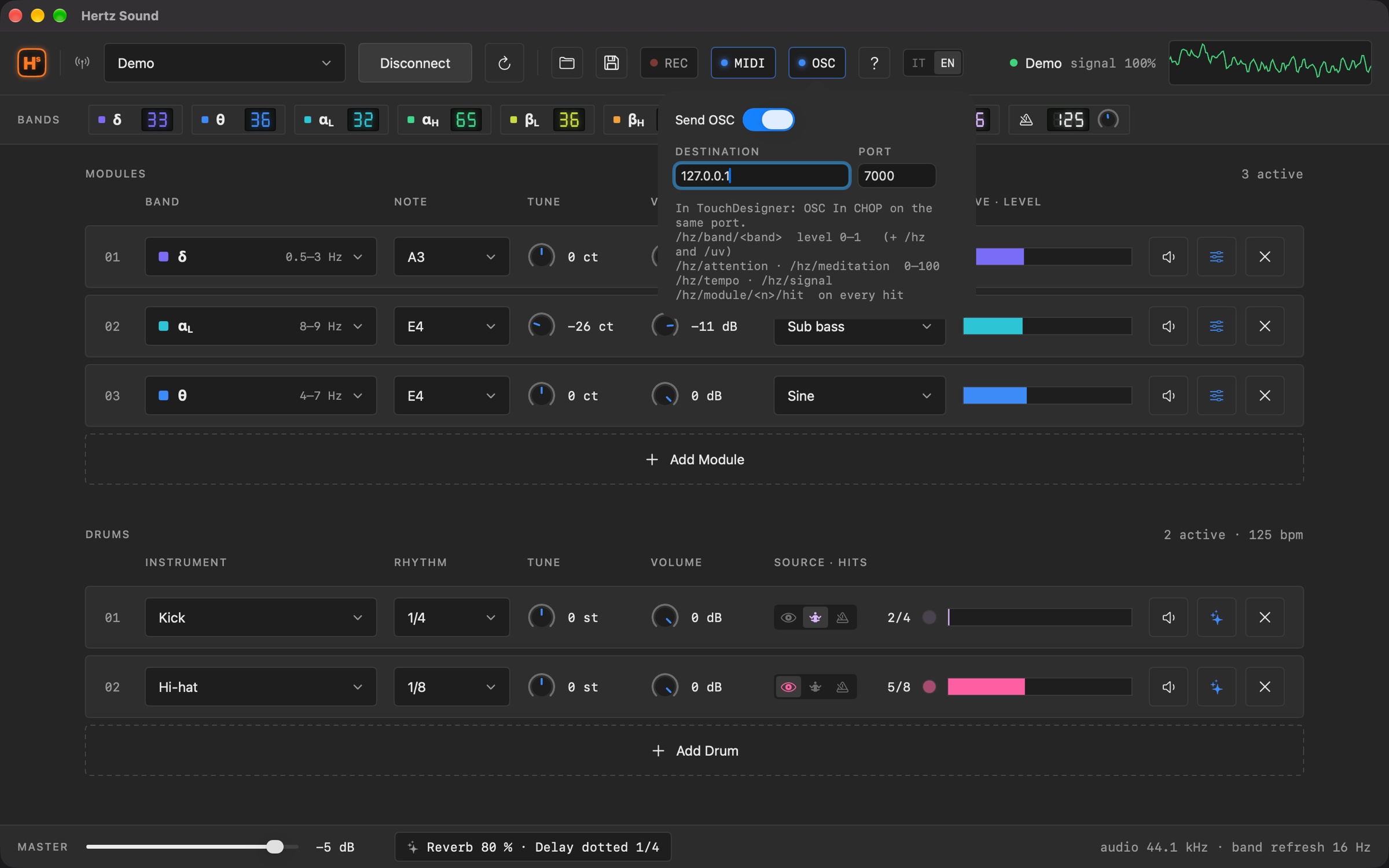
MIDI on with its blue light and the OSC panel open with destination, port and switch
MIDI and OSC on. The blue light says the MIDI port is active; the OSC panel sets destination and port.

OSC: TouchDesigner, Max, Resolume, VCV Rack

Open the OSC panel, choose destination and port (127.0.0.1:7000 by default) and turn it on: data goes out over UDP, about 30 times a second, to the address you chose. In TouchDesigner all it takes is an OSC In CHOP on the same port: each address becomes a channel. It also works with Processing and anything else that speaks OSC.

<band> = delta, theta, alfaL, alfaH, betaL, betaH, gamma.

/hz/band/<band>level 0–1
/hz/band/<band>/hzfrequency of the band's wave
/hz/band/<band>/uvamplitude in µV
/hz/attention0–100
/hz/meditation0–100
/hz/tempobpm
/hz/signalcontact quality 0–100
/hz/module/<n>/hit1 on every hit or tempo-synced note of module n
Touch Bar

The front panel under your fingers.

On MacBook Pros with a Touch Bar (2016–2022) Hertz Sound becomes an instrument you play without the mouse: REC, master, tempo and the seven bands in their colors. Tap a band and hear only that one. On other Macs nothing changes.

The Hertz Sound Touch Bar: REC, master with speaker, tempo with minus and plus, the 7 bands on colored displays, attention and meditation
Live, with the bands moving and the orange LED beating with the drums.

Solo a band, with a tap

Tapping a band on the Touch Bar solos it: every other module goes quiet and you hear only the ones it drives. Tap again to clear it. The solo also shows in the master bar, where one click turns it off.

View › Customize Touch Bar lets you remove or move what you don't need.

A band soloed from the Touch Bar, shown in the master bar
A soloed band, flagged in its color in the master bar.
● RECRecord to WAV; the red dot blinks and the time runs
masterThe volume slider; the speaker mutes and unmutes (⌘M)
− 120 +Tempo in bpm, hold to scroll
δ θ αL αH βL βH γBand levels; one tap = solo
eye · figureAttention and meditation
Guide, languages, keyboard

Explained inside, in two languages.

The built-in Hertz Sound guide with its list of topics
The guide (⌘?). Twelve topics: what it is, the icons, connection and recordings, bands and tempo, modules, sound, drums, effects, files, MIDI, OSC, purchases and shortcuts.

English or Italian, on the fly

The IT | EN switch changes language without restarting: window, menus, guide and Touch Bar follow. The shortcuts are the ones you'd expect from a Mac app.

Record to WAV / stop⌘R
Add module · drum⌘N ⌘⇧N
Open · save modules (.hzsound)⌘O ⌘S
Open EEG raw (.hzraw)⌘⇧O
Mute / unmute everything⌘M
Guide⌘?
Knob back to its defaultdouble-click
Privacy

The signal stays on your Mac.

No data collected

No account, no analytics, no ads, no tracking. The app only uses the network if you turn on OSC, and only toward the address you choose.

You decide the files

.hzraw sessions and .hzsound setups go wherever you choose; WAVs go to Music › Hertz Sound. No copies anywhere else. MIDI is a local virtual port.

macOS sandbox

Bluetooth is requested when you pick a headset, not at launch. The Demo and recordings start without asking for anything.

Pricing

Free to play. A clear price for a real headset.

Demo and recordings
Free

Forever, with every feature: sound, modules, effects, REC, MIDI, OSC.

Trial
3 days

Free, once: everything unlocked with your headset. At the end it disconnects; the Demo and recordings stay.

Yearly
€19.99 /year

Renews automatically every year at the same price; cancel whenever you like.

Forever
€47.99

One payment, no renewal, on all your Macs.

The Unlock window appears when you press Connect with a headset selected, or from the Sound menu › Unlock Hertz Sound…, which also has Restore Purchases for your other Macs with the same Apple account. Prices in your local currency are shown there.

The yearly subscription is charged to your Apple account on confirmation of purchase and renews automatically at the same price unless cancelled at least 24 hours before the end of the current period. Manage and cancel it in your App Store account settings. Payments, renewals and refunds are handled by Apple. Terms of Use · Privacy.

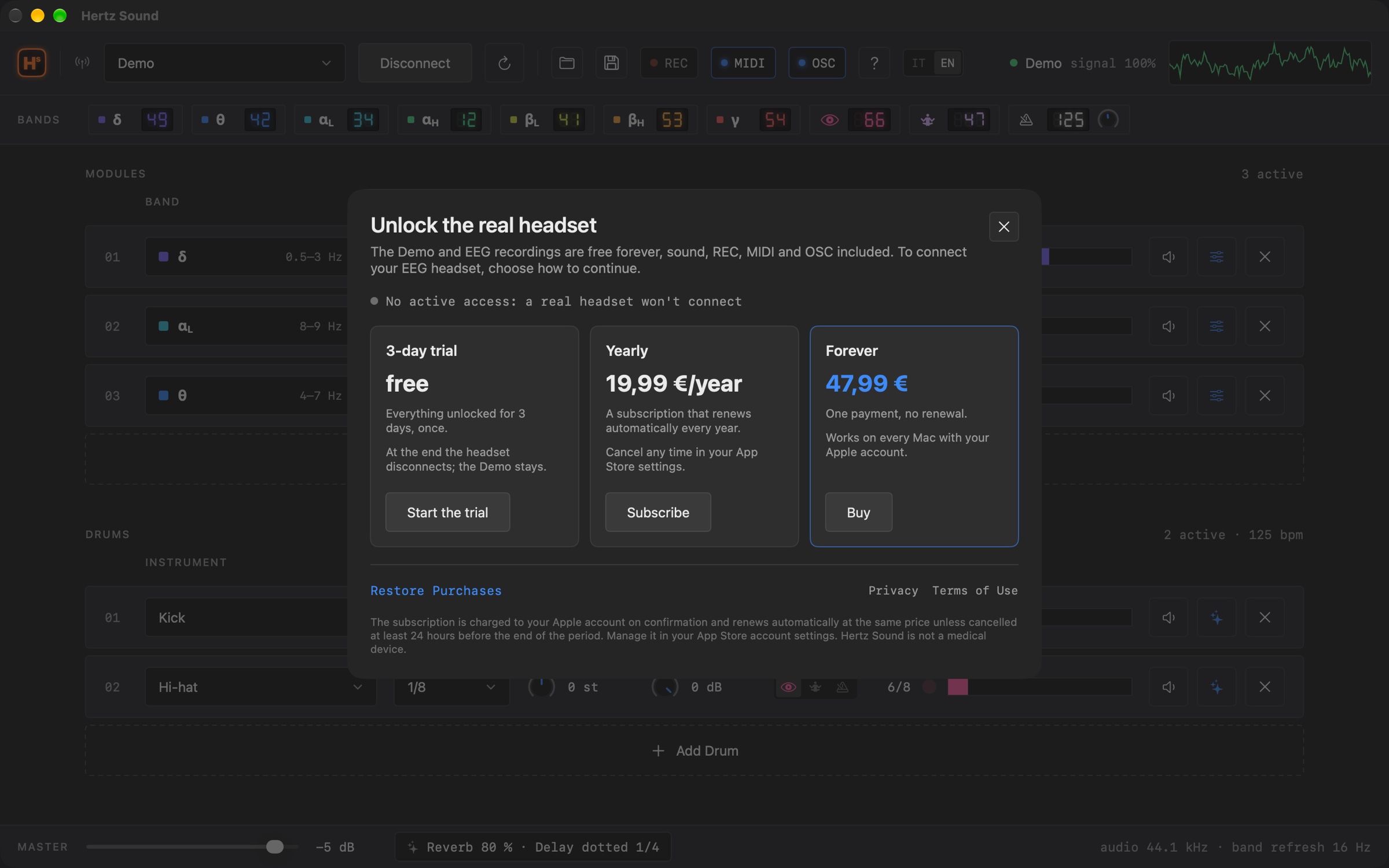
The Hertz Sound Unlock window with three offers: 3-day trial, yearly, forever
The Unlock window. Three offers, Restore Purchases, privacy and terms.
Compatibility

What's supported today.

Spelled out, so you don't buy for nothing. If your headset isn't listed, try the Demo first and write to us.

The Mac

  • macOS15 Sequoia or later
  • Apple siliconM1, M2, M3, M4 and later: the App Store version is native Apple silicon
  • Intel Macsnot supported by the App Store version for now
  • Bluetooththe Mac's own is enough: the headset pairs in macOS Settings as a serial port
  • Audio, MIDI, OSCthe Mac's speakers or the system audio interface; a virtual MIDI port for any DAW; OSC over UDP
  • Touch BarMacBook Pro 2016–2022, optional

The headset

  • NeuroSky MindWave Mobile 2over classic Bluetooth, with the headset's attention and meditation
  • TGAM-based clonese.g. Sichiray and similar, over classic Bluetooth (SPP serial port)
  • ProtocolThinkGear over a Bluetooth serial port (RFCOMM), forehead electrode and ear clip
  • Bluetooth LE onlyheadsets that only speak BLE, with no serial port, are not supported
  • Other EEG systemsMuse, Emotiv, OpenBCI and multi-channel: not supported

Hertz Sound doesn't use manufacturers' trademarks: "works with" only means the headset speaks the ThinkGear protocol. NeuroSky and MindWave are trademarks of their respective owners.

Questions

What everyone asks.

Is it a medical device? Does it measure anything about me?

No. Hertz Sound is a musical and creative instrument, not a medical device: it does not diagnose, treat or measure any health condition. The bands and the headset's indices are there to make the music play, not to tell you how you are. A single electrode on the forehead also picks up eyes and muscles: that's part of the game, and of the sound.

Do I need to know how to play?

No. When it opens there's already an ensemble that sounds good: you can just listen to how it changes. If you want to dig in, pick band, note and instrument for each module, and the sound panel takes you all the way to a real synth, with envelope, filter and drive.

How much does it cost?

Downloading is free, and the Demo and EEG recordings (.hzraw) stay free forever with every feature, REC, MIDI and OSC included. To connect a real headset, choose in the Unlock window: a free 3-day trial (once), the yearly subscription at €19.99 that renews automatically and can be cancelled in your App Store settings at least 24 hours before it renews, or €47.99 once, forever. Purchases work on every Mac with the same Apple account.

Can I try it without a headset?

Yes. When it opens the app is in Demo mode, with a believable synthetic EEG, and it plays right away. Everything works this way, including MIDI to your DAW and OSC: it's the right way to prepare your setup before the headset arrives.

How do I get the sound into my DAW?

Two ways. Turn on MIDI in the top bar: the "Hertz Sound" port appears in your DAW, with one module per channel, drums on 10 and bands as CCs on 16. Or press REC (⌘R) and you'll find a 24-bit WAV in Music › Hertz Sound, ready to drop onto a track.

How do I connect TouchDesigner?

Open the OSC panel, set address and port (127.0.0.1:7000 by default) and turn it on. In TouchDesigner add an OSC In CHOP on the same port: each address (/hz/band/alfaL, /hz/attention…) becomes a channel. The full list is above and in the app's guide.

The drums only play the first hit, or stay silent.

If they're silent, there's no signal: the headset is disconnected or the electrode isn't touching the skin well, and they restart on their own when the signal returns. If they only play the first hit, their source (attention or meditation) is low, or your headset doesn't send these indices, as happens with some clones: choose the metronome as the source and they'll play every hit.

The headset won't connect.

Almost always it's the battery: a flat battery shows up as a channel that won't open or as a silent stream. Try a fresh battery, check that the headset is paired in macOS Bluetooth Settings, press the refresh button in the app and leave a few seconds between attempts.

How is it different from Hertz Explorer?

They're sisters. Hertz Explorer lets you see the signal: trace, bands in µV, spectrum, time machine. Hertz Sound lets you hear it play. For rigorous recording and analysis there's Hertz 2.0, the high-end tool of the series, built for professional analysis.

Hertz Sound on the Mac App Store

Free, with the full Demo and EEG recordings and no time limit. To connect your headset: a free 3-day trial, then €19.99 a year or €47.99 once, forever. Macs with Apple silicon, macOS 15 or later.

Download on the Mac App Store